Workplace equipment
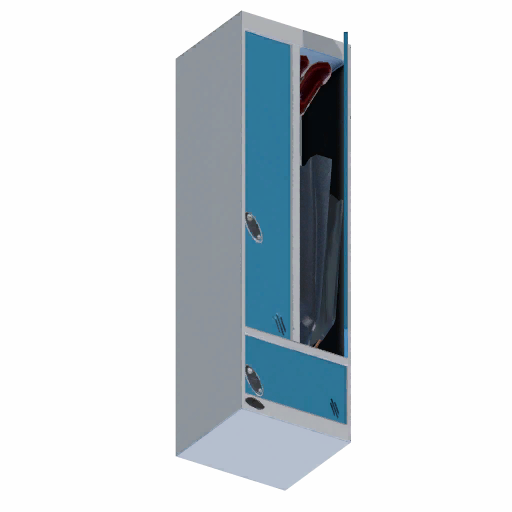
Uniform Locker in Big Ambitions
The Uniform Locker is the locker the game registers as a uniform locker for a business. Here is where to buy it, what it is used with, and how employee uniforms get assigned.
Place a Uniform Locker in the business where you want to manage uniforms, then use that business’s uniform controls to assign a preset to the relevant employee type.
Where to Buy the Uniform Locker
The store row comes from this site’s own location records, so the name, address and neighborhood always match the location entry.
Where this seller comes from: the item itself ships no store listing, so the row above is based on player reports we checked rather than on the item. A third-party 1.0 guide names a different store; that listing is deliberately not used.
| Seller | Neighborhood | Address | Price |
|---|---|---|---|
| AJ Pederson & Son | Garment District | Fifth Avenue 13 | $1,950.00 |
What Does the Uniform Locker Do?
The Uniform Locker is the item the game registers as a uniform locker. No business lists it as required equipment, so this page never claims a business requirement.
Uniforms are set per employee type instead of by dropping clothing into the locker. Each business type already defines its own uniform presets for the skills that work there.
How to Assign Employee Uniforms
Follow this order. Uniforms are registered per employee type rather than by dropping clothing into the locker, and the placement step is the one players skip most often.
- 1Place the Uniform Locker
Put it in the business where the uniforms should apply, not in a storage room of another business.
- 2Open the uniform controls
Use the Assign Uniforms shortcut on the locker, or the business’s current uniform settings if that business exposes them.
- 3Create or select a uniform preset
A preset describes the outfit. Each business type already carries its own preset set for the skills that work there.
- 4Assign the preset to an employee type
The preset only applies once it is assigned to the employee type on shift. Assigning it to the wrong type leaves that employee unchanged.
Employees Not Wearing the Uniform?
Check these first. The checker reports the first condition that is missing and never announces a game bug, because none of these checks can prove one.
Uniform Locker vs Other Lockers
Only one of these is a uniform locker, and only one of them is required by a business. A row only says No where the game treats the item as something else, not merely because the name differs.
| Item | Main purpose | Same as Uniform Locker? | Price |
|---|---|---|---|
| Uniform Locker | Employee uniforms | — | $1,950.00 |
| Gym Lockers | Business requirement | No | $2,350.00 |
| Office Lockers | No system relationship | No | $925.00 |
| Security Guard Locker | Employee workstation | No | $2,000.00 |
Which Businesses Use Employee Uniforms?
These business types employ the skills that wear uniforms. That is why the locker is useful here — it does not mean any of them requires it.
- BookstoreCustomer Service, Security GuardEmployee uniforms supported
- CinemaCleaning, Customer Service, ProjectionistEmployee uniforms supported
- Clothing StoreCustomer Service, Security GuardEmployee uniforms supported
- Coffee ShopCustomer Service, Security GuardEmployee uniforms supported
- Electronics StoreCleaning, Customer Service, Security GuardEmployee uniforms supported
- Fast Food RestaurantCustomer Service, Security GuardEmployee uniforms supported
- FloristCustomer Service, Security GuardEmployee uniforms supported
- Fruit And Vegetable StoreCustomer Service, Security GuardEmployee uniforms supported
- Gift ShopCustomer Service, Security GuardEmployee uniforms supported
- GymGym TrainerEmployee uniforms supported
- Jewelry StoreCustomer Service, Security GuardEmployee uniforms supported
- Liquor StoreCustomer Service, Security GuardEmployee uniforms supported
- NightclubCustomer Service, DJ, Security GuardEmployee uniforms supported
- SupermarketCustomer Service, Security GuardEmployee uniforms supported
- TheaterActor, Cleaning, Customer Service, Stage CrewEmployee uniforms supported
Which Employee Types Are Related?
Uniforms are assigned per employee type. These are the types that work in the businesses above, so these are the ones a preset can be assigned to.
- Customer Service
14 businesses
- Security Guard
12 businesses
- Cleaning
3 businesses
- Actor
1 business
- DJ
1 business
- Gym Trainer
1 business
- Projectionist
1 business
- Stage Crew
1 business
 Customer Service
 Security Guard
 Cleaning
 Actor
Actor DJ
DJ Gym Trainer
 Projectionist
 Stage Crew
Employee types use the same skills as the employee roles, so each type links to its own role page.
Related Lockers and Workplace Equipment
Similar lockers

Related workplace equipment


Common Item Questions
The store listed in the Where to Buy table above comes from this site’s own location records, with the current price from the item.
It is the locker the game treats as a uniform locker. It is used with a business’s uniform controls, and no business requires it.
Place the locker in the business, open its uniform controls, pick or create a preset, then assign that preset to the employee type that is on shift.
Work through the checklist above. It reports the first missing condition instead of guessing at a bug, and it says when every condition it can verify is covered.
No. Gym Lockers are a business requirement for the Gym, Office Lockers carry no system relationship, and the Security Guard Locker is an employee workstation. Only the Uniform Locker is a uniform locker.
No per-employee count is defined here. The locker is not listed as required equipment for any business, and this page has no rule that states how many lockers a business needs.
What should you do next?
How Employee Uniforms Work in Big Ambitions
Where to buy it the Uniform Locker is sold from a store catalog, and the price shown is the item’s own market price rather than a guess from a walkthrough.
What it is used with the item is used with a business’s employee uniform controls. Uniforms are registered per employee type, so assigning a preset to the wrong type changes nothing.
When uniforms do not show the checklist follows the order the setup actually depends on: locker, business, preset, assignment, then the employee type on shift.